


Aqara Home
4.4228.00 Reviews
App Specs
- Version
- 6.3.9
- Updated On
- License
- Free
- Downloads
- 500,000+
- Developer
- Shenzhen Aqara Software Service Co., Ltd.
- Categories
- House & Home
- Platform
- Android, iOS
Screenshots

 Analysis by AppCompare
I see Aqara Home as a control center for people who want everyday home routines to feel less hands-on, rather than as a gadget that makes a house smart by itself. It is a free House & Home app from Shenzhen Aqara Software Service Co., Ltd., and its value depends on whether you use compatible devices and want a single place to manage them. The app has a 4.1 average from around 11,000 ratings, with over 500,000 installs, so it has a substantial audience—but that popularity alone won’t tell you whether its ecosystem suits your home.
What “free” means when planning a smart home
The app itself is free to download, which makes trying its basic setup a low-cost first step. There are in-app purchases listed from $0.05 to $99.99 per item, but those figures do not tell me what any particular purchase covers or whether you need one for your intended setup. I would treat the app’s free access and the cost of building a compatible home as separate decisions: the first is easy to test, while the second depends on the devices you choose.
That distinction matters because a smart-home app is only useful when it can manage the equipment you actually own. Before buying anything, I’d check that the specific device you have in mind works with Aqara Home and think through what you want it to do. A cheap app download does not make incompatible devices work together, and the app’s listed price should not be mistaken for the total cost of a smart-home setup.
Where the value shows up in ordinary routines
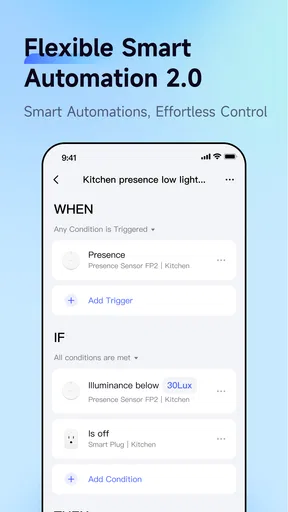
The payoff is less about opening an app for its own sake and more about reducing small repeated tasks. If you use compatible lights, sensors, blinds, or other equipment, scheduled actions and automations can connect them into routines. For example, you might want a sensor event to trigger a light, or a regular schedule to handle a task you otherwise remember to do each day. The useful question is not how many automations you can create, but which repeated action you would genuinely like to stop managing manually.
One practical way to begin is to set up a single, low-stakes routine and live with it for a few days. A scheduled light is easier to evaluate than a complicated chain of actions: you can see quickly whether the timing fits your household, then adjust or remove it if it becomes annoying. This also helps separate a real convenience from a clever setup that takes more effort to maintain than it saves.
Tradeoffs to weigh before committing
Aqara Home is most compelling when its compatible devices are already part of your plan. If your household uses a mix of products, check each device individually rather than assuming that the app’s ability to integrate with other devices means every brand or model will behave the same way. Smart-home compatibility can shape what you can automate, so it is worth checking before you spend money or build a routine around a device.
There is also a learning curve once you move beyond basic controls. An automation that sounds simple in your head may involve choosing a trigger, deciding what should happen, and testing it under real household conditions. I’d keep early routines straightforward and name them clearly, especially if other people at home will use the same setup. That small bit of care makes it easier to understand what a routine is meant to do when you revisit it later.
Worth Reading Before You Choose

Baby Panda World Brings Quick Play to Modern Phones, but Its Game Library Feels Busy

ESPN’s Live Game View Makes Following Close Games Easier

QuizzLand Review: A Good Fit for Short Trivia Breaks, Not Every Player

Basketball Stars: Multiplayer Is Fast, but Can It Recover When Matches Go Wrong?

WEBTOON Turns Phone Updates Into a Better Reading Routine

Link to Windows Runs on Shared Habits, Not Social Feeds
The app is rated for Everyone and its current version is 6.1.2, with Android 8.0 or later required. Those details help with the basic question of whether an Android phone can install it, but they do not settle device compatibility. I would check both sides before committing: the phone needs to meet the system requirement, and the smart-home equipment needs to suit the app and the tasks you have in mind.
Alright, folks, let's dive into the world of smart homes with the Aqara Home app. If you're like me, always on the hunt for a way to make life a little easier, then you're probably interested in what this app can offer. So, let's get comfy and take a closer look at how Aqara Home can turn your living space into a high-tech haven.
Getting Started with Aqara Home
First things first, setting up the app was a breeze. You download it from your favorite app store, and before you know it, you're ready to transform your house into a smart home. I was pleasantly surprised by how intuitive the setup process was. Within minutes, I was connecting all sorts of devices - from lights to temperature sensors. It's like having a magic wand for your home!
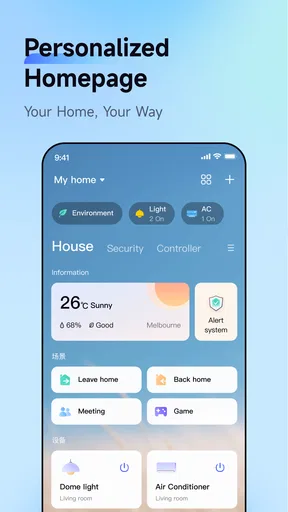
One thing to highlight is the app's user-friendly interface. It’s got this clean, uncluttered look that makes navigating through features a total breeze. Whether you're tech-savvy or a newbie, you won't find yourself lost in a sea of buttons and options. It's all laid out in a way that just makes sense.
Features that Make Life Easier
Now, let's talk about the features because, honestly, that's where the magic happens. With Aqara Home, you're not just turning lights on and off. Oh no, you're scheduling them, setting up automation, and even monitoring your home when you're miles away.
Imagine waking up to your blinds slowly opening as the sun rises, or having your heater kick in right before you get home from work. The automation options are endless, and they add a level of convenience that you didn’t realize you needed until you had it. Plus, the app supports voice control via popular assistants, which means you can boss your home around just by talking to it. How cool is that?
Security and Monitoring
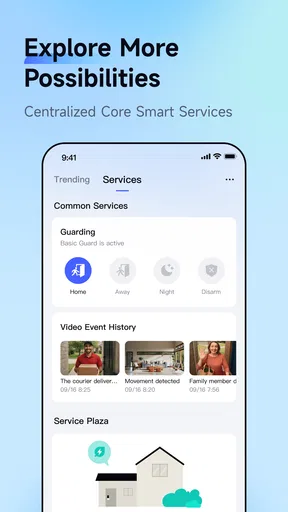
Security is another big selling point for Aqara Home. With compatible security cameras and sensors, you can keep an eye on your home no matter where you are. I found the real-time alerts particularly useful. If anything unusual happens, you’re the first to know, and you can take action right from the app. It's like having a security guard that never sleeps.
The app also offers detailed logs and reports, which are super handy if you need to track what’s been happening around your home. I found this feature particularly useful when I was away on vacation and wanted to ensure everything was running smoothly back home.
Integration with Other Devices
One of the standout aspects of Aqara Home is its ability to integrate with other smart devices. Whether you’re already invested in the ecosystem or just starting out, the app plays well with others. I was able to connect it seamlessly with my existing devices, and it all worked together without a hitch.
This integration capability means you can start small and gradually build up your smart home as you go. It's a flexible solution that grows with you, and that's something I really appreciate. Plus, it ensures you're not tied down to one brand, giving you the freedom to choose the best devices for your needs.
How it compares with other ways to manage a home
Compared with using a separate app for every smart device, a shared control point can make routines easier to understand and maintain. That advantage is strongest when the equipment works smoothly together; if your home is built around another brand or a particular phone platform, its own home app may be the simpler choice. I wouldn’t switch a working setup just because Aqara Home offers automation—the practical test is whether it can control the devices you rely on without creating a second, confusing layer.
It also differs from a basic remote-control app in what you can aim to achieve. Tapping a button is useful, but schedules and sensor-triggered actions can reduce the number of decisions you make throughout the day. The tradeoff is setup: a manual control needs little planning, while an automation deserves a clear trigger and a fallback plan. For a light, that might mean keeping an easy way to turn it on if a schedule no longer suits the room.
A realistic routine—and how to keep it reliable
Picture leaving home on a weekday while a sensor still reports activity in a room. Rather than making a chain of assumptions, I’d first decide exactly what should happen and when: perhaps a hallway light should switch on only after a relevant trigger, instead of treating any sensor change as a reason to illuminate the whole home. This is a small design choice, but it can prevent an automation from becoming irritating or wasting effort by reacting too broadly.
For a household with different schedules, I’d avoid building routines around one person’s habits unless everyone agrees. A timed action that is convenient during the workweek may be unwelcome on a quiet morning at home. Start with routines that are easy to observe, tell other household members what they do, and check the app’s activity history when something behaves unexpectedly. Logs are more useful as a troubleshooting aid than as a substitute for testing an automation yourself.
Remote monitoring can be reassuring, but I would treat an alert as a prompt to check what is happening, not as proof of an emergency or a guarantee that every event will be caught. The value of notifications depends on choosing compatible devices and setting them up in a way that produces information you can act on. If every minor event becomes an alert, you may start ignoring them; a smaller number of meaningful notifications is usually more useful in daily life.
Who is likely to get the most from it?
I’d recommend trying Aqara Home if you already have compatible Aqara equipment, or if you are planning a setup around devices you have checked will work with it. It is also a sensible fit for someone who enjoys shaping routines and is willing to test them rather than expecting every device to coordinate automatically. The app’s free download makes it easier to explore the interface before deciding how much to invest in equipment.
On the other hand, I’d skip it if you only need to control one device that already works well in another app, or if your existing smart-home system is organized around a different ecosystem. Adding another control app can create more places to check without giving you a meaningful improvement. It is also not the best choice for anyone who wants a completely hands-off setup and has no interest in checking compatibility, adjusting schedules, or troubleshooting a routine now and then.
For someone starting from scratch, I would choose a specific everyday problem first—such as remembering a light or wanting a sensor to trigger a useful action—then verify that the equipment required for that task is compatible. That approach is more reliable than buying several devices because they sound useful and only afterward discovering that they do not fit together as expected.
The Verdict
So, what's the final word on Aqara Home? In my book, it's a solid choice for anyone looking to dip their toes into the world of smart homes or expand their current setup. It's easy to use, packed with features, and offers peace of mind with its robust security options.
Sure, no app is perfect, and there might be a learning curve as you discover all the possibilities, but once you get the hang of it, there's no turning back. It’s like having your very own personal assistant that never needs a day off. So, if you're ready to elevate your home experience, give Aqara Home a shot. Trust me, your future self will thank you.
My recommendation is to judge it by one routine you would genuinely use, not by the longest feature list or the promise of a fully automated home. If the compatible devices you need are already in place, the app can make their schedules, alerts, and controls feel more connected. If you would need to rebuild a setup that already works, or buy equipment before confirming compatibility, the free download alone is not a reason to switch. For the right household it is a useful control layer; for everyone else, staying with a simpler or already-established option may be better.
Pros
- User-friendly interface for easy navigation.
- Seamless integration with smart devices.
- Customizable automation rules.
- Reliable real-time notifications.
- Supports voice control with assistants.
Cons
- Limited compatibility with some brands.
- Requires stable internet for optimal use.
- Occasional app crashes reported.
- Setup can be complex for beginners.
- Limited customer support options.
FAQs for Aqara Home
What is Aqara Home and what devices does it support?
Aqara Home is a smart home app designed to control and manage various Aqara devices, such as smart lights, sensors, and cameras. It supports integration with popular platforms like Apple HomeKit, Google Assistant, and Amazon Alexa, allowing you to control your smart home devices seamlessly via voice commands or through the app itself.
Is Aqara Home compatible with both Android and iOS devices?
Yes, Aqara Home is compatible with both Android and iOS devices. This ensures that you can control your Aqara smart home devices from your smartphone or tablet, regardless of the operating system. Just download the app from the Google Play Store or Apple App Store to get started.
How user-friendly is the Aqara Home app for beginners?
Aqara Home is designed with user-friendliness in mind, featuring an intuitive interface that makes it easy for beginners to set up and manage their smart home devices. The app provides step-by-step guides and clear instructions to help users connect and configure their devices effortlessly.
Does Aqara Home require a hub to operate its devices?
While some Aqara devices can work independently, many require an Aqara Hub to connect and function properly. The hub acts as a central controller, ensuring that your devices communicate effectively and can be managed remotely via the Aqara Home app.
Are there any subscription fees associated with using Aqara Home?
No, there are no subscription fees required to use the Aqara Home app. Once you purchase the necessary devices and, if applicable, the Aqara Hub, you can download and use the app to control your smart home without any additional costs.


